
Removing vocals from a song is one of the most common tasks for singers, DJs, content creators and producers. Whether you want to create a karaoke backing track, make a remix, or practice over an instrumental version of your favorite song, you need a reliable vocal remover that works on common formats like MP3, WAV and MP4.
In this guide, you will learn how vocal removal works, what the main methods are (online tools, free editors like Audacity, and AI-powered desktop software), and why Kanto Vocal Remover is an excellent solution if you want stable quality, unlimited processing and full control over your audio files.
Download now Kanto Vocal Remover
Select Windows or MAC version
WINDOWS VERSION: 
MAC VERSION: 
Why remove vocals from a song?
There are many scenarios where you might want to remove or isolate vocals from music:
- Karaoke backing tracks – sing over the original instrumental without the lead voice.
- Practice and study – practice guitar, piano, drums or vocals using a clean instrumental.
- Remixes and mashups – isolate vocals or instrumentals for creative production.
- Content creation – use instrumentals as background music in videos, streams or podcasts.
- Acapella extraction – separate the vocal track to analyze it or process it separately.
Today, most vocal removal solutions are based on AI source separation, which means the software analyzes the audio and splits it into stems (vocals, drums, bass, other instruments). The quality of the result depends heavily on the model and on how the tool processes your files.
Common ways to remove vocals (and their limits)
Before focusing on Kanto Vocal Remover, it’s useful to understand the three main approaches people use today:
1. Free online vocal removers
There are many websites that let you upload a song and download an instrumental or vocal-only version. They are quick to try and usually free for small files, but they often have limits:
- File size limits or length restrictions (e.g. only a few minutes per track).
- Daily or monthly quotas unless you pay a subscription.
- Queue times and server busy errors when many users are connected.
- Privacy concerns – you must upload your song to a remote server.
- Variable audio quality: sometimes good, sometimes full of artifacts.
These tools are nice for a quick test, but if you regularly create karaoke tracks or remixes, relying only on online services quickly becomes frustrating.
2. Free editors like Audacity
Traditional audio editors such as Audacity include effects like “Vocal Reduction and Isolation”. These methods are usually based on phase cancellation and simple filters. They can work on certain tracks (especially when vocals are perfectly centered and the mix is simple), but they have important drawbacks:
- Results depend a lot on the original mix: some songs will never sound clean.
- There is no real AI separation of stems; it is more like a smart EQ trick.
- You often lose bass, stereo width or other elements of the mix.
- There is no easy batch processing for many songs in a row.
For casual experiments, Audacity can be enough, but for modern productions and karaoke work you usually want something more advanced and consistent.
3. AI desktop software – the modern solution
AI-based desktop software runs powerful separation models directly on your PC. This gives you:
- Better quality – stems are cleaner, with fewer artifacts.
- Local processing – your audio never leaves your computer.
- No limits – you can process as many files as you want, in full length.
- More control – advanced options, batch processing, custom exports.
Kanto Vocal Remover belongs to this third category: it combines a simple interface with professional AI algorithms to remove vocals or isolate them from common audio and video formats.
What is Kanto Vocal Remover?
Kanto Vocal Remover is a dedicated Windows and MAC software designed to remove or isolate vocals from music and video files. It supports popular formats such as MP3, WAV, FLAC, M4A and MP4, making it ideal both for audio-only tracks and for music videos.
The software uses AI-based separation models to split your song into stems (vocals and instrumental), allowing you to:
- Create karaoke backing tracks without the lead voice.
- Export acapella vocals for remixes and mashups.
- Fine-tune the balance between vocals and instruments.
- Batch process multiple songs in one session.
Unlike many online solutions, Kanto Vocal Remover is installed on your PC and works offline, so you always keep control of your files and your workflow.
Key advantages of Kanto Vocal Remover
1. Higher and more consistent audio quality
Because Kanto Vocal Remover is built around AI separation, it can handle complex mixes better than simple phase-cancellation methods. You typically get:
- Cleaner instrumentals with fewer “ghost vocals”.
- More natural-sounding backing tracks without hollow or metallic artifacts.
- Usable acapellas for remixes and edits.
2. Works with both audio and video (MP3, WAV, MP4…)
Many producers and singers work with YouTube downloads, performance videos or MP4 karaoke files. Kanto Vocal Remover can load not only audio files (MP3, WAV, FLAC) but also video formats like MP4, extract the audio, process it and give you the separated tracks.
This is extremely handy if your source material is a music video or a live performance video and you want only the instrumental part.
3. No upload, no online limits
Because everything runs locally:
- You do not need to upload large files to external servers.
- You avoid long waiting times when the online service is busy.
- You are not limited by song length or daily quotas.
- Your private recordings stay on your machine.
If you process many songs every week, this alone can save you a lot of time and frustration.
4. One-time license instead of monthly subscription
Most advanced online vocal removers work with subscription plans. Kanto Vocal Remover uses a classic software license model: pay once, use it as much as you want on your PC, with updates included for the license period. For regular users, this is often more convenient and cheaper in the long term.

5. Easy to use, even if you are not a sound engineer
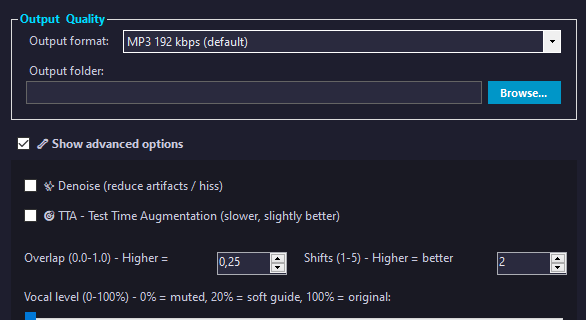
The interface is designed for singers, teachers and creators, not only for audio technicians. The typical workflow is:
- Import your song (MP3, WAV, FLAC, MP4, etc.).
- Choose whether you want to remove vocals, isolate vocals or adjust the mix.
- Let the AI process the file.
- Preview the result and export the instrumental or vocal stem.
You don’t need deep knowledge of EQ, phase or stereo imaging: the heavy work is done by the algorithm.
Comparison: Kanto Vocal Remover vs other solutions
| Feature | Kanto Vocal Remover | Online vocal remover | Free editor (e.g. Audacity) |
|---|---|---|---|
| Processing method | AI stem separation on your PC | AI on remote servers | Filters / phase cancellation |
| Supported formats | Audio + video (MP3, WAV, FLAC, MP4, etc.) | Often audio only, sometimes limited formats | Mainly audio (no native video support) |
| Quality consistency | High, optimized for karaoke & remixes | Good but variable depending on service load | Highly dependent on original mix, often inconsistent |
| File size and length limits | No practical limits on your PC | Yes, often limited length/size or daily quota | No strict limits, but manual workflow |
| Privacy | Local processing, files stay on your computer | Files uploaded to third-party servers | Local processing |
| Batch processing | Yes, multiple songs in a session | Usually one file at a time | Possible but manual and time-consuming |
| Cost model | One-time license | Free with limitations / monthly subscription | Free, but limited vocal removal quality |
| Best for | Singers, karaoke creators, serious producers | Occasional users, quick tests | Hobby users who like manual tinkering |
Step-by-step: how to remove vocals with Kanto Vocal Remover
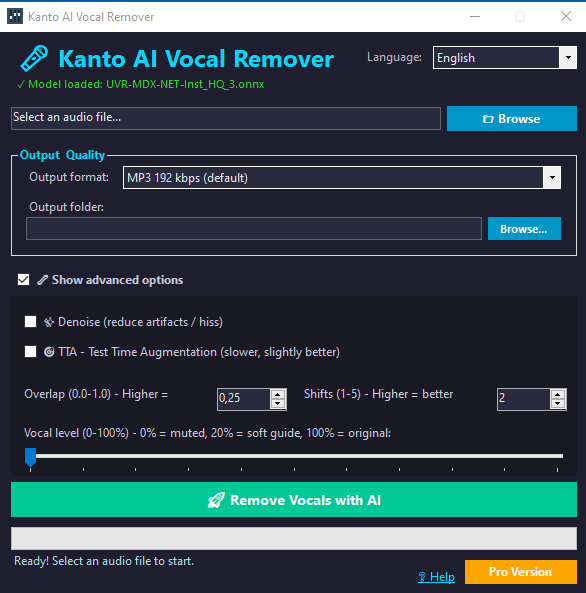
Here is a typical workflow to create an instrumental from your song:
- Install and open Kanto Vocal Remover on your Windows PC.
Download now Kanto Vocal Remover
Select Windows or MAC version
WINDOWS VERSION:
MAC VERSION:
- Click on “BROWSE” and select your MP3, WAV, FLAC or MP4.
- Select the output folder and optionally vocal level in advanced options
- Start the Remove Vocals with AI and wait for the analysis to finish.
Once you get used to the workflow, processing multiple songs becomes very fast. This is especially useful if you’re preparing a full karaoke setlist or a DJ set with custom edits.
If you only need to remove vocals from one or two songs, a free online vocal remover might be enough. But if you work regularly with backing tracks, karaoke, remixes or music teaching, investing in a dedicated AI desktop solution makes a big difference in quality, speed and reliability.
Kanto Vocal Remover offers:
- High-quality AI separation of vocals and instruments.
- Support for both audio and video formats (MP3, WAV, MP4…).
- Local processing with no upload limits or privacy issues.
- A simple interface, designed for real-world karaoke and music use.
- A convenient one-time license instead of recurring subscriptions.
If you are serious about creating karaoke tracks, backing tracks or remixes from your favorite songs, Kanto Vocal Remover is a powerful and user-friendly tool that can quickly become a core part of your workflow.


